

Recent Digital Payment Fraud Scenarios: How to Prevent and Respond to Account Compromise
Digital payment fraud does not always begin with someone hacking into a bank account. It may begin with a convincing phone call, a password-reset message or an email containing new payment details. The payment system may work normally, but the user is tricked into sending money to the wrong person.
This article explains three common scams: a fake call from bank or fintech support, the takeover of an account through a phone number or email account, and the replacement of genuine payment details with fraudulent ones. For each scenario, it explains the warning signs, how to reduce the risk and what to do immediately if money or account access is lost.
The examples are fictional, but the methods they describe are commonly used against consumers and businesses.
Why Digital Payments Can Be Vulnerable
A payment account is linked to other services, especially your phone number and email. If a criminal gains control of either one, they may use it to reset a password, approve a new device or hide a security alert.
Sometimes the attacker enters the account without permission. In other cases, the user is persuaded to approve the payment. The criminal may impersonate a trusted company, create urgency and claim that moving the money will keep it safe.
The correct response depends on what happened. If access was stolen, the user must regain control of the linked phone and email as well as the financial account. If the user sent the money after being deceived, rapid reporting, a recall request and evidence preservation become especially important.
If a customer sends a transfer after being deceived, it is often called authorised push payment (APP) fraud. If the attacker sends it without the customer's consent, it may be an unauthorised transaction. A security check may show which device or code approved a payment, but it does not by itself explain whether the customer was tricked.
From a legal and practical perspective, I find that the hardest fraud cases are often not the most technically sophisticated. The system may record a valid approval even though the user's decision was produced by deception.
Case 1: The Fake Bank-Support Call
A customer receives a call from someone claiming to be from the bank's fraud team. The caller says suspicious activity has been detected and the account must be protected immediately. The victim is told to confirm a code, approve an in-app prompt or move money to a safe account while the bank investigates.
The story sounds believable because it uses the language of genuine fraud prevention. The caller creates fear, offers reassurance and makes the transfer seem like a protective step. In reality, the victim is being guided away from the provider's trusted channel and into a payment controlled by the attacker.
The bank's records may show that the payment was correctly approved. But the approval was obtained through deception. When reporting the incident, the victim should explain both what they clicked and what the caller said.
Urgency should itself be treated as a security warning. A genuine bank or fintech provider should not object if the customer ends the call and contacts it again through an official channel.
RED FLAGS. An unexpected security call; pressure to act immediately; a request for a password, one-time code or screen share; instructions to move money; or coaching on what to say if the bank questions the payment.
CONTROL POINT. End the contact. Open the provider's official app or type its saved website address yourself, then contact support independently. Caller ID, logos and case numbers are not proof.
IMMEDIATE RESPONSE. Ask official support to restrict the account, reset exposed credentials from a clean device, preserve the caller's number and messages, and report the destination account and payment reference.
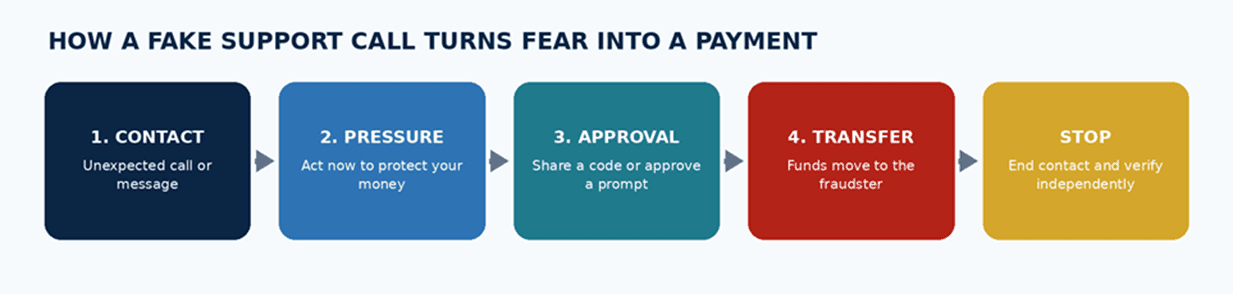
Fig. 1. The fake-support attack chain and the safest point to stop it.
Case 2: Account Takeover Through a Reset Route
In the second scenario, the criminal takes control of the phone number or email account used to reset a password. These are often called reset routes or reset channels. Once one is compromised, the attacker may be able to enter the banking or fintech account from another device.
A SIM swap is one version of the attack. The first warning may be a sudden loss of mobile service. While the user is trying to understand why calls and messages have stopped, password-reset links and text-message codes may already be reaching another device.
Another version begins with a stolen or reused password. If the same password is used for shopping, email and payment services, one compromised account can lead to another. Control of the email account may also allow the attacker to approve a new device and hide security messages.
The financial account may be the final target, but the attack can begin with the phone carrier, email account or an unrelated website where the password was reused.
Users often protect the banking app but overlook the email account or phone number that can unlock it. I would treat all three as part of the same security system.
RED FLAGS. Unexpected loss of mobile service; a new-SIM or number-transfer notice; password resets you did not request; sudden email or app lockout; unfamiliar-device alerts; or missing authentication codes.
CONTROL POINT. Prefer an authenticator app or security key to text-message codes where available. Add a carrier PIN or number-transfer lock, use a separate password for email and enable strong multi-factor authentication.
IMMEDIATE RESPONSE. Contact the carrier and financial providers while securing email. Revoke unknown sessions, change reused passwords and check for new payees, changed contact details or pending transfers.
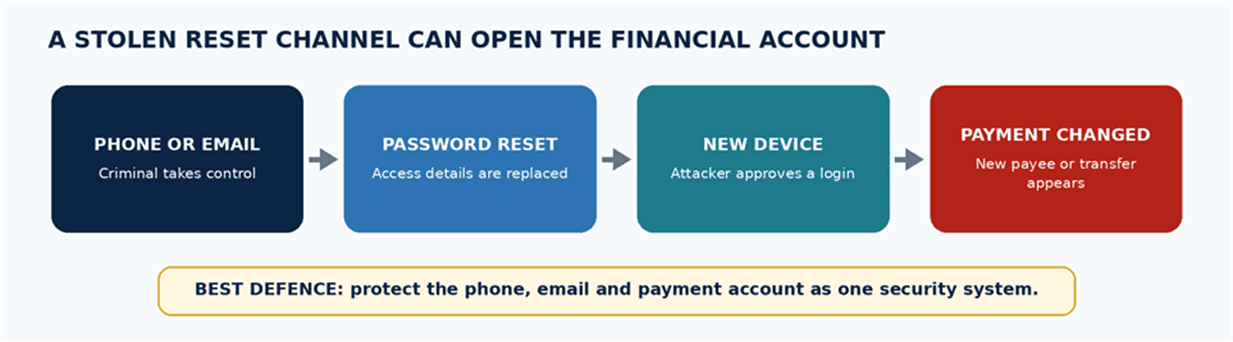
Fig. 2. How control of a phone number or email account can lead to financial-account access.
Case 3: Payment-Recipient Manipulation
Payment-recipient manipulation does not require the attacker to steal a password or take over a device. The attacker simply changes where the money is sent.
For a consumer, this may be a fake payee added during a support scam. For a business, it often appears as invoice redirection. A supplier, contractor or adviser seems to send new bank details, but the replacement account belongs to a criminal.
The invoice may look genuine. The email may appear inside a familiar conversation, and the amount may match the real transaction. Only the destination has changed.
The trap works because the request looks routine. Checking only the recipient's name or the last few account digits is not enough.
For businesses, I recommend treating every change of payment details as a high-risk event, even when it appears in a familiar email thread. A short callback to a number already on file is far cheaper than trying to recover a completed transfer.
RED FLAGS. A new account for a known recipient; changed details close to a deadline; a request to bypass normal approval; movement of the conversation to a messaging app; or payment instructions that cannot be checked through a known contact.
CONTROL POINT. Use a verified payee list or approved vendor record. Confirm every change through a second channel and a phone number already on file. Require two approvals for high-value payments.
IMMEDIATE RESPONSE. Record the payment reference, destination account, beneficiary name, time, amount, message headers and screenshots. Alert the sending provider immediately and request any available freeze or recall, then make the appropriate fraud report.
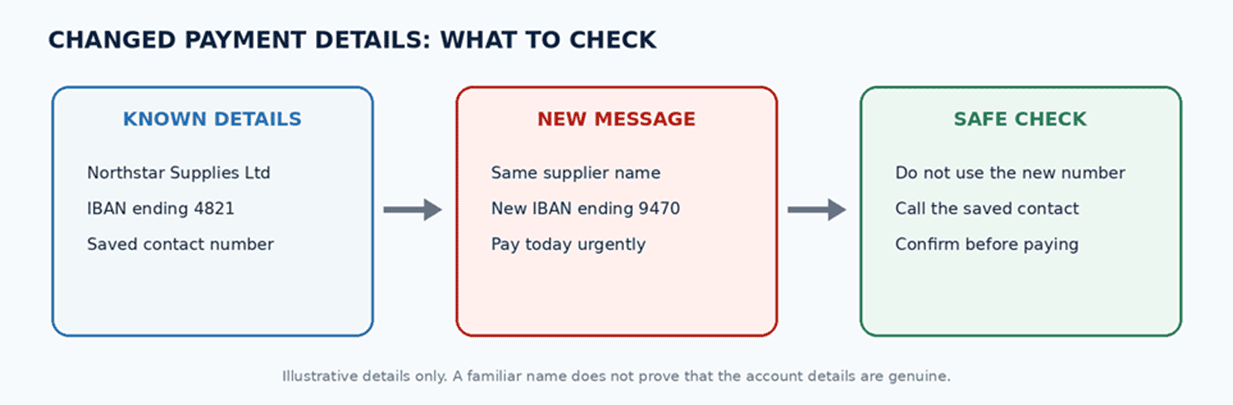
Fig. 3. Fictional account details show why a familiar recipient name is not enough.
Three Attacks at a Glance
horizontal scroll
| Attack | What is compromised | Early warning | Best control | First recovery priority |
|---|---|---|---|---|
| Fake support | Trust and payment approval | Unexpected urgency | Independent callback | Notify provider and reset sessions |
| Account takeover | Phone, email or reset route | Loss of service or lockout | Non-SMS authentication | Recover access and restrict accounts |
| Recipient manipulation | Where the money is sent | Changed payee details | Second-channel check | Report destination and preserve evidence |
Fig. 4. Each attack reaches the money through a different weak point, so the correct recovery action is not the same in every case.
The First-Hour Recovery Playbook
Start by identifying what was affected: the payment account, phone number, email, device, card, login session or recipient details. Calling every incident an account hack can send the response in the wrong direction.
- Stop and isolate. End the contact, close the suspicious page and stop using a device that may be compromised. Recover accounts from a clean device and trusted connection.
- Secure phone and email. Regain the mobile number, protect email, revoke unknown sessions and replace reused passwords. Email often controls every other reset.
- Protect the money. Ask official support to restrict the account, card or payment function. Review pending transfers, saved payees, linked cards, direct debits and recently approved devices.
- Preserve evidence. Save account details, names, amounts, payment references, times, screenshots, messages, phone numbers, web addresses and any software the attacker asked you to install.
- Report quickly and in parallel. Notify the sending provider and, if known, the receiving institution. Ask for any available freeze or recall and register any applicable reimbursement claim. Report through the relevant police or national fraud channel.
- Expect a second scam. A person promising guaranteed recovery, charging an up-front fee or asking for remote access or login details may be running another scam.
Once a loss occurs, speed and a clear evidence trail usually matter more than a long initial explanation. Contact the provider first, then organise the screenshots, messages and transaction references while they are still available.
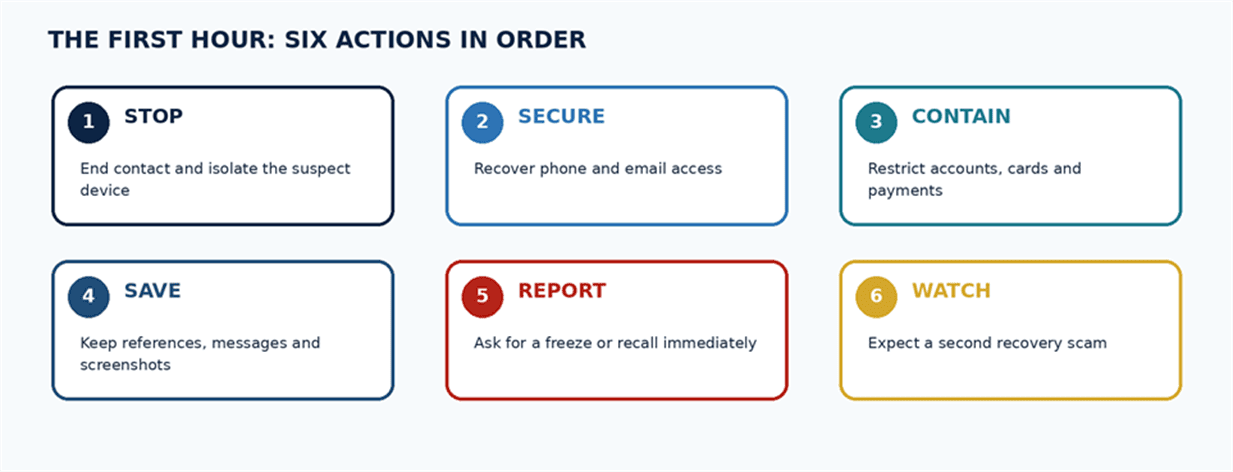
Fig. 5. A simple sequence for stopping further loss and preserving recovery options.
What Blackcat Users Should Know
Your Blackcat account depends on the security of your phone, email, device and payment instructions. A scammer may not need to break into the app. They may instead persuade you to act, take over a reset route or pretend to be support.
Treat every unexpected contact as unverified. Never provide a PIN, password, one-time code or card details, and do not follow an unsolicited security link. Blackcat's current security guidance says it does not initiate calls to customers or ask for account-access codes or PINs through email or chat.
For an unusual or high-value transfer, slow down. Check the recipient and all account details, and do not rely on a caller's explanation of why the payment is urgent. A genuine provider can tolerate an independent check. A fraudster usually cannot.
If a Blackcatcard may be compromised, block it in the app by opening Money, selecting the card and choosing Block card. Then contact support through the in-app or online Support Chat.
For an eligible SEPA transfer, review the Verification of Payee result. A match confirms that the name and account correspond, but it does not prove that the invoice, message or payment request is genuine.
FAQ:
Can a bank transfer be reversed?
Sometimes, but not always. The options depend on the payment method, jurisdiction, reporting speed and whether the money has already moved. A provider may attempt a freeze or recall. Any refund or reimbursement claim is separate and depends on the applicable rules and facts.
What should I do if my phone suddenly loses service?
Contact the carrier from another phone and notify financial providers while recovering the number. Secure the linked email, revoke unknown sessions and then review recent logins, new payees and outgoing payments.
Is it safe to trust payment details from an email thread?
Not by itself. A genuine conversation can be compromised, copied or changed. Confirm new details through a known phone number or approved contact route.
What if I entered my password on a fake page?
Stop using the page. Change the password from a clean device, revoke sessions and replace the same password anywhere else it was reused. Secure the linked email first if it controls password resets.
Should I pay a recovery company?
Be cautious. No service can guarantee recovery. Avoid anyone demanding an up-front fee, remote access, card details, login credentials or one-time codes.